

Team 02 - 2026
Team Goal: Clarity for Advisors, Confidence for Students

Team Mentor & Product Owner
Aaron Whittenberger
Independence, Kentucky, USA
Aaron Whittenberger has over 35 years of Business and Information Technology experience, including 20 years of business analysis and 15 years as a Consultant.
He has earned his CBAP, AAC, CPOA, A-CSPO, ICP-APO certifications.

Project Manager
Sadie Moore
Tampa, Florida, USA
I am a Certified Associate in Project Management through PMI with a background in human services and community development. and I am currently pursuing a second graduate degree in Business Analytics.
I’m passionate about building systems, process improvement, relationship building, leadership development, and event planning. I aspire to lead data-driven projects that improve the culture, operations and efficiency of an organization.

Developer
Paul Machong
Lagos, Nigeria
Results-driven Java Backend Engineer with 5+ years of experience building secure, scalable financial systems and enterprise applications. Skilled in Java 17/21, Spring Boot, microservices, high-concurrency transaction processing, and REST APIs. Experienced in corporate lending, trade finance, automated debt recovery, database optimization, distributed caching, cloud infrastructure, and AI integration. Passionate about designing reliable, high-performance backend solutions that solve real-world business challenges.

Business Analyst
Chukwuebuka Mbonu
Inverness, Scotland, United Kingdom
Business Analyst experienced in supporting strategic transformation initiatives across Banking, Financial Services and Insurance (BFSI) sectors. Passionate about aligning regulatory requirements, business needs, and technology solutions to maximise business value, improve processes, and deliver successful business outcomes.

User Interface & User Experience
Sherry Grimm
Birdsboro, Pennsylvania, USA
Sherry Grimm is an experienced Salesforce Administrator and 7x Certified Professional with a background in process automation and cross-functional leadership. She brings operational insight to translating complex business needs into stable, data-accurate solutions.
Her expertise spans requirement gathering, stakeholder alignment, and maximizing project impact to drive strategic system improvements.

Business Analyst
Blessing Chukwujekwu
Lagos, Nigeria
I'm a banking professional with experience in business development, financial services, and customer relationship management. Always passionate about Business Analysis, Problem-Solving, and Process Improvement, with an interest in leveraging technology to drive business solutions.
Through the SDLC Experience Program 2026, I aim to strengthen my practical skills and grow into a competent Business Analyst, contributing to impactful business and technology solutions.

Business Analyst /
Quality Assurance Analyst
Abosede Babatunde
United Kingdom
Abosede Babatunde is a Business Analyst with experience across insurance, consulting, technology and data. She collaborates with stakeholders to understand business needs, investigate root causes, improve processes, define requirements and use data to inform decisions. She leads IIBA UK’s Students and Early Careers Initiative and is passionate about digital transformation, user-centred services and developing aspiring Business Analysts.
HealthCare Connect -
Rural Hospital
Digital Patient Intake System
Project Deliverables - By the Project Manager
Project Plan
Project Manager: Sadie Moore
Like any other project, the plan served as our roadmap and defined the project overview, scope, deliverables, roles, and approach so everyone on the team understood what we were building, why, and how we would get there. It gave us a shared reference point for decisions and kept the team aligned as we moved through each phase of the SDLC. Our first lesson was that a strong plan depends on a clear understanding of the deliverables and the project overview before anything is started. We reviewed the plan as a team to make sure it was not built on assumptions, which can create confusion later. We also learned that I needed every input from my team before the plan was complete. Each member owned their piece of the work, and their input made the plan realistic to complete in the given time. Finally, I was reminded that a project plan is a living document. We had to revisit it regularly and keep track of what needs to be updated as requirements, priorities, or circumstances changed so it reflected where the project actually stood.
Purpose
This Project Plan explains how team 2 will execute and deliver the MVP Digital Patient Intake System, bringing together the approved Project Scope and Project Schedule with the Developer's Feasibility Assessment.
1. Project Overview
The hospital's current paper-based intake process causes delays, duplicate EHR data entry, and medication-list errors. This project will deliver an MVP digital intake system which will cover digital patient registration and medication list management in a tablet-based intake experience for patients, nurses, providers, and compliance leadership.
Per the approved Product Vision and Business Need Summary, the primary users are rural hospital patients checking in for appointments and the nurses/intake staff who support check-in. The compliance team and the IT team are secondary stakeholders. The desired outcome is that patients complete an accurate, easy-to-use digital check-in on a tablet. Staff will have access to EHR with no duplicates including medication lists that are current and verified, so patients are seen faster and more safely.
2. Inputs to This Plan
-
Approved Project Scope
-
Approved Project Schedule
-
Business Need Summary
-
Business Objectives
-
Product Vision Statement
-
Developer Feasibility Assessment Findings
-
Current State Assessment
-
Draft Requirements List — functional requirements substantially complete; non-functional requirements pending
3. Feasibility Summary
(the document continues...)
Project Schedule
Project Manager: Sadie Moore
The project schedule turned the plan into a timeline. It mapped each deliverable to a due date, showed the order the work had to happen in, and helped us track progress against the time available. It worked as both a planning tool and an accountability tool, because it made clear what was coming up and who was responsible for it.
Accountability is important to me because I know exactly who I need to follow up with or help with any asks without assuming someone will do it. Our biggest lesson was the importance of knowing every deliverable's due date up front and checking that the timeline was realistic for the timeframe we had. Having an accurate and current schedule helped us keep the scope and MVP requirement at the top of our priority list.

Project Deliverables - By the Product Owner
Product Vision Statement
Project Owner: Aaron Whittenberger

(the document continues...)
Business Objectives
Project Owner: Aaron Whittenberger

(the document continues...)
Business Need Summary
Project Owner: Aaron Whittenberger
1. Executive Summary
HealthCare Connect is a proposed tablet-based digital patient intake platform for a rural hospital. The initiative addresses a slow, paper-based and error-prone check-in process in which nurses manually re-enter patient information into the Electronic Health Record (EHR). The intended outcome is an accurate, easy-to-use digital check-in that patients can complete and review once on a tablet, with information flowing directly into the EHR and medication lists verified before appointments. The initiative is being pursued to improve patient safety and regulatory compliance, increase intake efficiency, and improve patient satisfaction while keeping the solution simple for a lean rural care team to adopt and support.
2. Problem Statement
The current patient intake process is paper-based, slow and prone to error. Rural hospital patients experience delays during check-in, while nurses and intake staff must manually re-enter patient information into the EHR, creating duplicate work and increasing the risk of mistakes. Medication-list errors are a particular concern because compliance reviews have identified them as a patient-safety risk. If the problem remains unresolved, the hospital will continue to experience avoidable duplicate data entry, inefficient intake, medication-information accuracy risks and a poorer patient experience.
3. Target Users
• Primary users: Rural hospital patients checking in for appointments, and nurses/intake staff who support the check-in process.
• Secondary users/stakeholders: Compliance teams that monitor medication-list errors and the IT team that supports the digital intake system.
• User needs: Patients need a simple, accurate tablet-based check-in that can be completed without help or prior training. Intake staff need patient information to flow directly into the EHR without re-entry and need a fast, reliable way to verify current medication lists before appointments. Compliance stakeholders need improvement in medication-list accuracy, while IT needs a solution that can be supported within a lean rural hospital environment.
4. Constraints & Assumptions
• Constraints: The solution is expected to operate as a tablet-based patient intake platform, feed submitted information directly into the hospital EHR, be simple enough for patients to use without prior training and remain practical for a lean rural hospital team to adopt and support. Detailed budget, timeline, resource, policy, accessibility, security and technical-integration constraints are not specified in the Product Vision and require further validation.
• Assumptions: The Product Vision does not state formal planning assumptions. Any assumptions relating to device availability, EHR interface capability, stakeholder availability, infrastructure or data readiness should therefore be elicited and validated during Planning & Project Initiation rather than treated as confirmed facts.
• Stakeholder alignment: The Product Vision establishes the MVP direction as digital patient registration, medication-list management and a tablet-based intake experience. It also establishes direct EHR data flow, no duplicate re-entry, medication verification before appointments and a simple no-training patient experience as key boundaries. Detailed requirements and technical design remain to be agreed during subsequent analysis.
5. Expected Business Value
• Strategic benefit: Improve patient safety and regulatory compliance, increase operational efficiency for intake staff, and improve patient satisfaction while enabling a digital intake capability that a rural hospital can adopt and support.
• Operational benefit: Eliminate avoidable duplicate data entry, improve the accuracy of patient and medication information, shorten intake time, support medication verification before appointments and improve the overall patient check-in experience. Success is targeted through a 75% reduction in duplicate data entry within 90 days, a 50% reduction in medication-list errors within 6 months, a 20% reduction in average intake time within 3 months, 90% tablet adoption among intake staff within 60 days, and 85% patient satisfaction within 6 months.
• Financial value or ROI: The Product Vision does not provide a quantified financial benefit or ROI. Expected economic value is therefore limited at this stage to productivity gains from reduced duplicate entry and shorter intake time, together with risk reduction from improved medication accuracy. Any cost savings, implementation costs or ROI should be quantified separately when sufficient baseline and cost data are available.
(the document continues...)
Project Deliverables - By the Business Analyst
Business Analyst: Chukwuebuka Mbonu
Scope Statement
1. Project Overview
HealthCare Connect is a digital patient intake initiative designed to address the rural hospital’s current slow, paper-based, and error-prone check-in process, which requires staff to manually re-enter patient information into the Electronic Health Record (EHR). This duplicate effort contributes to intake delays, transcription errors, and medication-list inaccuracies that create patient-safety and compliance risks. The MVP will provide a simple, web-based, tablet-compatible solution that supports nurse-mediated check-in, enables patients to review and update their demographic and medication information, and securely exchanges verified intake data with the existing EHR while remaining a separate solution that does not replace it. The initiative will improve patient safety and data accuracy, strengthen compliance, increase operational efficiency, and deliver a more streamlined patient intake experience
2. Project Objectives
-
Objective 1: Reduce duplicate patient data entry by 75% within 90 days of launch.
-
Objective 2: Reduce medication-list errors by 50% within six months of launch.
-
Objective 3: Reduce average patient intake time by 20% within three months of launch.
-
Objective 4: Achieve 90% staff adoption of the tablet-based intake process within 60 days of launch.
-
Objective 5: Achieve at least 85% patient satisfaction with the digital intake experience within six months of launch.
3. In-Scope Boundaries
-
Features/functions included: Digital patient registration; electronic capture, review, confirmation, and submission of personal and insurance information; pre-population of available patient medical information on tablets; medication-list entry, update, review, and staff verification; tablet-optimized patient intake forms with simple, accessible navigation; staff visibility of submitted intake information and completion status; pre-appointment access to intake information; and staff tools to support patients during tablet intake.
-
Business units included: Nursing and intake operations, Compliance, and IT, with patients as the primary users of the digital intake experience.
-
Processes included: Patient registration and tablet-based intake; review and confirmation of personal and insurance information; pre-population of available patient information; medication-list entry, update, and verification; digital submission of intake information; staff review of submitted information without duplicate data entry; monitoring of intake completion; and assisted intake where required.
4. Out-of-Scope Boundaries
-
Excluded features/functions: Replacement or re-architecture of the existing EHR; non-tablet intake channels, including kiosks, personal mobile devices, and online/pre-registration portals; advanced clinical decision support or medication interaction alerts beyond basic medication-list verification; third-party insurance verification or eligibility integration; and analytics/reporting beyond that required to measure the agreed project success metrics.
-
Excluded business units: No business units are currently identified as out of scope; any exclusions identified during delivery will be assessed and agreed with relevant stakeholders.
-
Future-phase considerations: multi-language support, alternative intake channels, advanced clinical functionality, third-party integrations, and enhanced analytics may be considered for future releases based on validated business needs, user feedback, technical feasibility, and stakeholder prioritization; these capabilities are not part of the current MVP.
5. Assumptions
-
Technology Availability: Tablets and reliable network connectivity will be available in each intake area, subject to confirmation.
-
EHR Integration: The existing EHR will support direct data exchange with HealthCare Connect, subject to the Developer Feasibility Assessment.
-
Staff Availability: Nursing and front-desk staff will be available to support patients during the transition to tablet-based intake.
-
Security & Compliance: Existing device security and infrastructure will meet hospital compliance requirements for handling patient data on tablets.
6. Constraints
-
Time constraints: Delivery must align with the SDLC Experience Workshop milestone schedule, limiting the scope achievable within the available timeframe.
-
Budget constraints: No specific budget or funding limit has been defined; any funding requirements identified during delivery will require stakeholder confirmation.
(document continues....)
Current State Assessment
Business Analyst: Chukwuebuka Mbonu
1. Current Process Overview
The current patient intake process is paper-based, with patient information captured on paper forms during check-in. Nurses/intake staff manually re-enter the captured information into the Electronic Health Record (EHR), resulting in duplicate manual data entry. The paper-based process contributes to delays, data-entry risks, medication-list accuracy concerns, and longer patient wait times.


2. Pain Points & Inefficiencies
• Bottlenecks: Manual re-entry of patient information from paper forms into the EHR is the clearest process bottleneck. It duplicates staff effort and contributes to intake delays.
• Manual workarounds: The current process relies on paper forms and re-entry of patient information from paper into the EHR
• Delays and rework: Paper-based intake and manual EHR entry contribute to longer patient wait times and delays in care. The frequency and causes of rework are not documented and require validation.
• User or stakeholder impact: Patients experience long waits and frustration; nurses/intake staff perform avoidable duplicate manual data- entry and associated risk of mistakes; compliance stakeholders face medication-list accuracy, patient-safety and compliance concerns; hospital leadership is impacted by patient intake efficiency, patient experience and compliance concerns.
3. System/Tool Inventory

4. Improvement Opportunities
• Process improvements: Replace paper-dependent intake with a streamlined digital workflow; reduce duplicate staff entry; establish a clear medication review/verification step; and clarify handoffs, exceptions and fallback procedures during requirements elicitation.
• Technology improvements: Provide a tablet-based digital intake capability supporting electronic registration, medication-list management, staff visibility of submitted information and intake-status monitoring. The mechanism for avoiding re-entry must be confirmed; EHR integration is not assumed in this assessment.
• Data improvements: Enable patients to review information before submission, improve medication-information capture and verification, and reduce transcription risk created by repeated manual entry.
• User experience improvements: Provide a simple, accessible tablet experience that patients can navigate without prior training, with staff support available where required, to reduce effort, waiting and frustration.
Project Deliverables - By the Business Analyst/QA
Requirements List
Business Analyst/Quality Assurance: Abosede Babatunde

(document continues....)
Prioritized Backlog


Business Analyst: Chukwuebuka Mbonu
Business Analyst/Quality Assurance: Abosede Babatunde


Backlog Estimation by Point Size
Business Analyst: Chukwuebuka Mbonu

Current State Map
Business Analyst:
Chukwuebuka Clement Mbonu

Proposed Future State Map
Business Analyst:
Chukwuebuka Clement Mbonu

Requirements List
Business Analyst: Chukwuebuka Clement Mbonu

(document continues....)
User Stories
Business Analyst: Chukwuebuka Clement Mbonu

(document continues....)
Acceptance Criteria
Business Analyst: Chukwuebuka Clement Mbonu

(document continues....)
Project Deliverables - By the QA Analyst
Prioritized Backlog
Business Analyst/Quality Assurance: Abosede Babatunde
1. Project Overview
The healthcare facility previously relied on a paper-based patient intake process, with information subsequently entered into the Electronic Health Record (EHR) system. This created opportunities for duplicate data entry, delays, inaccurate patient information and medication-record discrepancies. The HealthCare Connect project introduced a digital patient intake solution that allowed patients to review, verify and update relevant information through a tablet-based application. Authorised intake staff could then review the completed information before it was submitted to the EHR. The Minimum Viable Product (MVP) aimed to improve the accuracy and efficiency of patient intake, reduce unnecessary manual handling and provide a more consistent, accessible and secure experience for patients and healthcare staff.
Business Objectives
-
Reduce reliance on paper-based patient intake and subsequent manual data entry.
-
Enable patients to verify their identity and review relevant information before completing intake.
-
Allow permitted updates to personal, health, insurance and medication information.
-
Improve the accuracy and completeness of information submitted to the EHR.
-
Provide authorised staff with appropriate access to review and manage completed intake records.
-
Support a clear, accessible and secure patient experience while retaining a paper-based fallback when digital intake is unavailable.
2. Testing Objectives
i. Verify that the developed solution met the agreed business and functional requirements.
ii. Validate the implementation of user stories and acceptance criteria.
iii. Identify, document and communicate defects to the development team.
iv. Confirm that patient information was displayed accurately and that permitted updates were retained.
v. Validate the sequence, navigation and usability of the patient intake journey.
vi. Assess authentication, authorisation, data protection and EHR submission requirements.
vii. Verify that the solution operated correctly on approved devices and met agreed accessibility and performance requirements.
viii. Provide evidence to support business acceptance and an informed release decision.
3. Testing Scope
In Scope
The following functionality and requirements were included in the test plan:
-
Retrieval of agreed patient information from the EHR.
-
Patient identity verification using name and date of birth.
-
Display of intake sections in the agreed sequence.
-
Review and permitted updates to appointment and personal information.
-
Review and updates to health history, insurance and medication information.
-
Ability to leave comments for the doctor.
-
Review and correction of information before completing intake.
-
Intake completion and availability of submitted information to authorised staff.
-
Authorised staff authentication, unlocking, review and permitted updates.
-
Submission of reviewed patient intake information to the EHR.
-
Restriction of patient access to the designated intake application.
-
Monitoring of active patient intake status.
-
Paper-based intake fallback.
-
Role-based access and protection of patient information.
-
Data retention, recovery and security requirements.
-
Approved tablet compatibility, accessibility, usability and performance requirements.
(document continues....)
Test Cases
Business Analyst/Quality Assurance: Abosede Babatunde


Defects
Business Analyst/Quality Assurance: Abosede Babatunde

Project Deliverables - By the UI/UX Designer
Wireframe - Update Patient Information
UI/UX Designer: Sherry Grimm
How It Was Used:
The wireframe translates the user flow into a structural interface blueprint, allowing you to define the exact layout, data fields, and controls required on each screen prior to prototyping.
Lessons Learned:
When working with user stories, granularity is critical. Instead of relying on generic high-level categories, specific data elements must be defined. Clarifying details early eliminates the need for repetitive requirement elicitation sessions with stakeholders.

(document continues....)
Flow - Update Patient Information
UI/UX Designer: Sherry Grimm
How It Was Used:
This deliverable maps out the end-to-end sequential journey for the Patient. It maps verification, retry limitations, and the step-by-step paths for editing personal, insurance, medication, and health history data fields, along with confirmation and completion of the document.
Lessons Learned:
Diagramming from the viewpoint of the user requires you to think through the logical steps of the process, ensuring the journey is intuitive prior to creating a wireframe.

(document continues....)
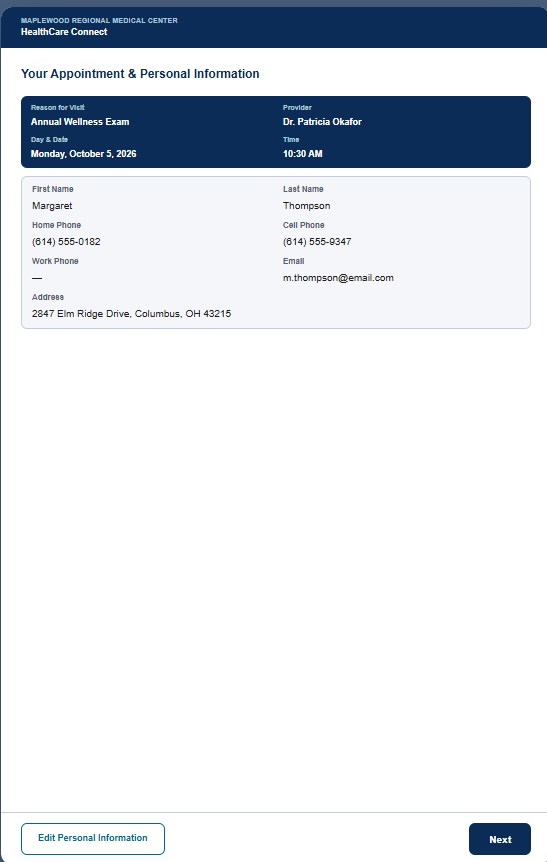
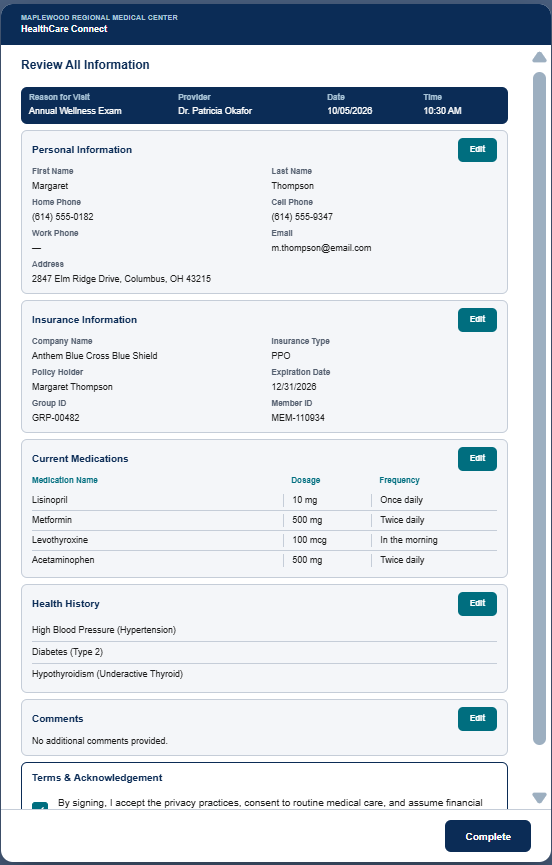
Prototype Screens
UI/UX Designer: Sherry Grimm
How It Was Used:
The interactive prototype simulated the end-to-end patient experience, validating that our paper-based logic functioned correctly in a live user environment. Once updated and approved by stakeholders, it served as the single source of truth for the developer. Having a pre-approved, fully simulated workflow ensured that the final developed application matched requirements exactly, saving significant development time and preventing technical rework.
Lessons Learned:
No matter how thoroughly a project is mapped out on paper, testing a live simulation will always reveal unexpected friction points and layout inconsistencies. Catching these visual and logical cases during the prototyping phase eliminates the need for costly post-development code adjustments.




Project Deliverables - By the Developer
1. Feasibility Conclusion
Overall assessment:
-
Feasible (We can build it all with zero limits)
-
Feasible with constraints / further investigation (We can build it, but we must follow specific design limits)
-
Not currently feasible
Summary:
The HealthCare Connect platform is completely realistic and achievable to build as a web-based app that runs smoothly on hospital tablets.
The biggest challenge is how we share data with the hospital’s main Electronic Health Record (EHR) system. Since the EHR vendor has not given us an API (a digital connection plug) to write data directly into their database, we will act strictly as a Data Provider. This means we will save all patient intake data safely in our own secure database and provide a secure digital "service window." The EHR can open this window to pull the data whenever it wants. What the EHR chooses to do with the data once they pull it is completely out of our project scope.
2. Plain-Language System Flows
To make the app easy for everyone to use and keep data safe, the system will use three very simple, non-technical steps:
Flow A: The Step-by-Step Patient Check-In (Single-Input Focus)
Instead of putting a giant, confusing paper form on a small tablet screen, we will show only one question at a time.
-
The Handover: A nurse clicks a patient's name on a desk screen. This loads the tablet with that patient's basic info (like name and appointment time) already sent from the hospital's schedule.
-
The Security Check: The patient grabs the tablet and types their First Name, Last Name, and Date of Birth. If it matches, the form unlocks. If it fails, the tablet stops and tells them to ask a nurse for help.
-
The Question Wizard: The patient clicks "Next" through simple screens: Screen 1: Verify Address ➡️ Screen 2: Verify Phone/Email ➡️ Screen 3: Verify Insurance ➡️ Screen 4: Update Medications.
-
The Big Review: At the very end, one single screen shows all their answers together. The patient reviews everything, taps a big "Submit Intake" button, and hands the tablet back to the nurse.
Flow B: Intelligent Medication Sourcing & Library Expansion
To cut down on typing mistakes and help hit our goal of reducing medication list errors by 50%, we will use a smart search tool.
-
The History View: The tablet shows the patient a list of medications they have taken in the past. They can tap to confirm or remove them.
-
The Smart Search Bar: If they need to add a new medication, they start typing. Once they type 3 letters, a helpful dropdown list appears with correct spellings (using a built-in dictionary of standard medicines).
-
The Manual Override: If they are taking a rare medicine that is not in our dictionary, the system will not block them. It lets them type the raw name by hand.
-
The Quality Review Queue: Any name typed by hand is secretly flagged and sent to a special Library Update Recommendations folder. This lets clinical staff review it later and add it to the permanent dictionary if it is correct.
🔐 3. Safe API Handshake (Our Digital Service Window)
Since our system holds sensitive health data, we must ensure that only the trusted hospital EHR system can pull it. We protect this "digital service window" using two security guards:
-
The Guarded IP List (IP Whitelisting): Think of this like a secure office building entrance list. Our database will block all incoming connection requests unless the request comes explicitly from the exact computer address (IP address) of the hospital server.
Developer: Paul Machong
Feasibility Assessment
(document continues....)
HealthCare Connect - The App
To test: use this data:
first name 'Margaret'
last name 'Whitfield'
date of birth '03/14/1948'
Developer: Paul Machong
Impact of the SDLC Experience Workshop

Project Manager
Sadie Moore
Comprehending the various roles involved in the Software Development Life Cycle process.

UI/UX Designer
Sherry Grimm
The IIBA Tampa Bay SDLC Experience Workshop provided valuable professional development during a recent career transition. Having previously been part of an enterprise Salesforce Admin team where we handled all responsibilities, I was fortunate to find this resource offering hands-on exposure to how large, specialized teams function. The immersive structure ensures that by having access to all training tracks, you gain a comprehensive understanding of how the cross-functional units work together, no matter which role you are assigned. This experience directly prepared me for my current position on a larger team, where I am much more knowledgeable and effective because of it. I am incredibly grateful for the opportunity to participate in such an impactful program

Developer
Paul Machong
The 2026 SDLC Experience Workshop was my first opportunity to work on a project with people playing diverse roles across different countries.
Although I had previously worked with professionals in some of these roles, my interactions were mostly limited to areas directly related to my responsibilities. The workshop gave me the opportunity to understand their thought processes, challenges, and contributions.
For instance, my previous interaction with QA was mostly through documented test results indicating whether a test passed or failed. During the workshop, I got to participate in discussions around test criteria and what determines a successful test.
I also gained hands-on experience applying the SDLC lifecycle, managing deadlines, giving constructive feedback, and using tools such as Miro, Kanban, and GitLab.
Beyond the technical experience, I worked with amazing and skilled teammates. I talked less and listened more, which allowed me to learn from different perspectives. Moving forward, I want to be more proactive in contributing ideas and participating in discussions.
Overall, the experience strengthened my appreciation for teamwork, communication, and collaboration in delivering quality projects.
My sincere appreciation to all my team members for their contributions towards completing the project within the stipulated timeframe.
Special gratitude to the IIBA Tampa Bay Chapter for putting together this valuable learning experience.


